How to Design a Workflow: Principles and Common Mistakes
Designing a workflow means deciding how work should move — choosing the trigger, the stages, the handoffs, the ownership, and the completion state deliberately, rather than letting them accumulate by default. Every workflow already has a design; the only question is whether anyone chose it. Paths that nobody designed still have stages (wherever work happens to stop), owners (whoever tends to pick things up), and completion states (whatever people treat as finished) — they're just structured accidentally, which is why they behave unpredictably.
Design is the counterpart to mapping. Mapping documents the path you have; design produces the path you want. In practice the two run together — you map to understand, then design the changes — but they're different activities with different failure modes, and this guide covers the second.
Six Principles of Workflow Design
1. Design from the work item's perspective, not the org chart
The most common structural error is building a workflow around who does what department-wise, producing a path that mirrors reporting lines rather than the work's actual journey. Start instead from the item: what does this request need, in what order, to become finished? Then assign people to those needs. Departmental structure should inform who staffs a stage — never how many stages exist or where the boundaries fall.
The test: if your workflow's stages have the same names as your teams, you designed the org chart, not the path.
2. Make stages reflect ownership transitions
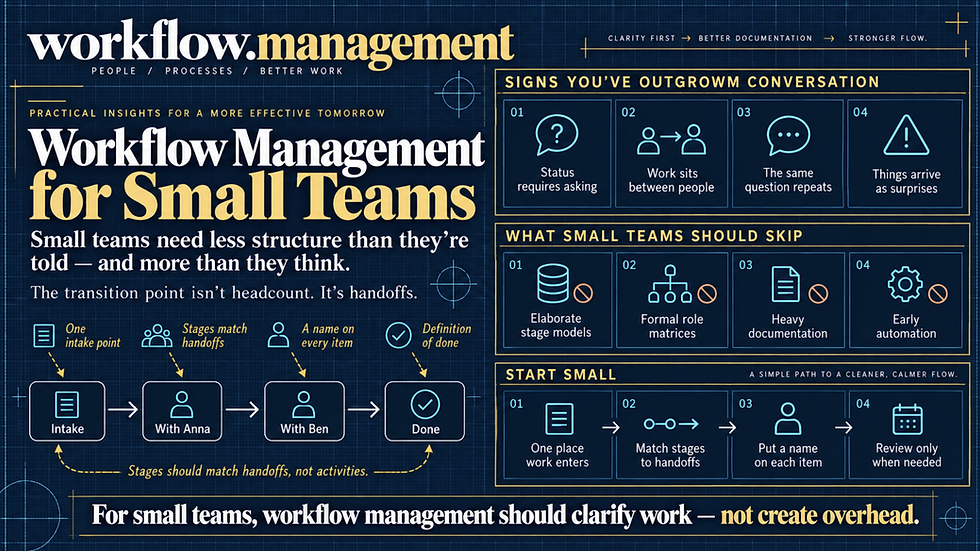
A stage should exist because responsibility changes hands there — not because a different kind of activity happens. "Draft" and "revise" performed by the same person with no handoff between them are one stage, not two; splitting them adds tracking overhead without adding clarity. Conversely, any point where the work passes to someone else must be a stage boundary, even if the activities look similar on either side.
This principle keeps stage counts honest. Most over-engineered workflows are over-staged, and nearly always because stages were drawn around activities instead of transfers.
3. Design intake as carefully as the rest of the path
Intake is the highest-leverage stage in most workflows and the least deliberately designed. It determines what information travels with the item, which determines whether every downstream stage can act immediately or must first go back and ask. A request that arrives complete moves; a request that arrives vague generates a clarification round-trip at every stage that touches it.
Design intake by working backward: ask what each downstream stage needs to know, and capture exactly that at the front door — no more (long forms suppress legitimate requests and push people to informal channels) and no less.
4. Define completion explicitly, and for every stage
"Done" needs a definition at the workflow level and at each stage boundary. Stage-level completion is what makes handoffs clean: the receiving side knows what it's getting, and the sending side knows when to release it. Without it, handoffs become negotiations, and items bounce back for reasons the sender couldn't have anticipated.
Write completion criteria as observable conditions — approved by the named reviewer and attached to the record, not ready to move forward.
5. Design the exception paths, not just the happy path
Most workflow designs describe what happens when everything goes normally. Real workloads deviate constantly: rejections, missing information, urgent items, cases that don't fit any category. If the design ignores these, they fall out of the structured path into email and improvisation — where they consume disproportionate attention, remain invisible, and account for most of the workflow's actual pain.
Design at minimum: what happens when work is rejected or returned, what happens when required information is missing, what happens to urgent items, and what happens to items that fit no defined category. That last one is essential — a designated path for "this doesn't fit" prevents the entire category of work that silently leaves the system.
6. Design for the common case, and let exceptions be exceptional
The complementary principle. If 80% of items are routine and 20% are complex, design the path around the 80% and route the rest to an exception path — rather than building one path robust enough for the hardest case and forcing every simple item through it. Uniform paths designed for worst cases are the main source of workflow overhead, and finance's uniform approval chain (the $200 renewal traversing the $200,000 contract's review) is the canonical example.
Six Common Mistakes
Designing the ideal instead of the achievable. A path that requires perfect compliance to function will be abandoned in its first busy week. Design for how people actually behave under pressure — including their tendency to bypass structure when it's faster to — and make the designed path the path of least resistance rather than relying on discipline.
Adding stages to increase visibility. Stages are frequently added not because ownership changes but because someone wants status granularity. This buys reporting detail at the cost of tracking overhead at every transition, and it degrades data quality as people update stages retroactively or not at all. If the goal is visibility, add fields or views — not stages.
Over-designing before running it. Workflow designs are hypotheses. Elaborate structures built in advance encode assumptions about volume, exception rates, and behavior that turn out wrong in contact with real work. Design the smallest complete path — trigger, essential stages, owners, completion — run it, and add structure where reality demands it.
Automating during the design phase. Automation locks in whatever structure exists when it's configured. Design, run manually long enough to see where the path is genuinely wrong, then automate the steps that proved stable. Automating a design before it's been tested industrializes its mistakes.
Assigning stages to teams. Design-time ownership decisions must land on a named person or a specific role, not a department. "Legal review" as a stage owner produces the ownerless-stage failure at runtime, no matter how good the rest of the design is.
Designing without the people in the path. Designs produced in isolation miss the informal steps that make the current workflow function — the check someone always does, the context they always add. Those steps look like inefficiency from outside and turn out to be load-bearing. Involve the participants, and specifically ask what they do that isn't in anyone's description.
A Practical Sequence
For a workflow you're designing or redesigning:
Define the boundaries — one trigger, one completion state, written down before anything else.
List what the item needs — the transformations required to get from trigger to completion, from the item's perspective.
Group into stages by ownership transition — combine anything one owner does contiguously; split wherever responsibility transfers.
Name an owner per stage — a person or specific role, never a team.
Write stage-level completion criteria — observable conditions that tell the receiver what they're getting.
Design intake backward from what stages need to know.
Design the exception paths — rejection, missing information, urgency, uncategorizable.
Run it manually for enough volume to see where reality diverges from the design.
Instrument it — cycle time, wait time by stage, work in progress — so changes can be evaluated rather than argued about.
Automate the stable steps, once they've proven stable.
Steps 8 through 10 are where most design efforts stop short. A design that has never met real work is a proposal, and the difference between a good workflow designer and a good workflow design is entirely in what happens after the first contact.
FAQ
What makes a good workflow design? Clear boundaries (one trigger, one defined completion state), stages that correspond to ownership transitions rather than activity types, a named owner at every stage, observable completion criteria at each handoff, intake that captures what downstream stages need, and designed exception paths. Good designs are also small — structure added deliberately, as reality demands, rather than built elaborately in advance.
How many stages should a workflow have? As many as it has ownership transitions, and no more. Stages exist to mark where responsibility changes hands; adding them for reporting granularity increases tracking overhead and degrades data quality. Most workflows that feel over-engineered were staged around activities rather than transfers.
What's the difference between mapping and designing a workflow? Mapping documents the path that currently exists, including workarounds and waits. Design specifies the path that should exist. They're sequential in practice — map first, because designing against the official version of the work fixes problems that don't exist — but they're separate activities with different outputs.
Should you design a workflow before choosing a tool? Generally yes. Tools shape designs toward whatever their interface makes easy, which is rarely the same as what the work needs. Designing first — even roughly — means the tool is evaluated against your path rather than your path being conformed to the tool's defaults.
How do you know if a workflow design is working? By measurement against a baseline: cycle time, wait time by stage, and work in progress before and after the change. Subjective improvement is unreliable, since a new design feels better simply for being deliberate. The harder test is whether items stop accumulating where they used to and whether the exception path is actually being used rather than bypassed.